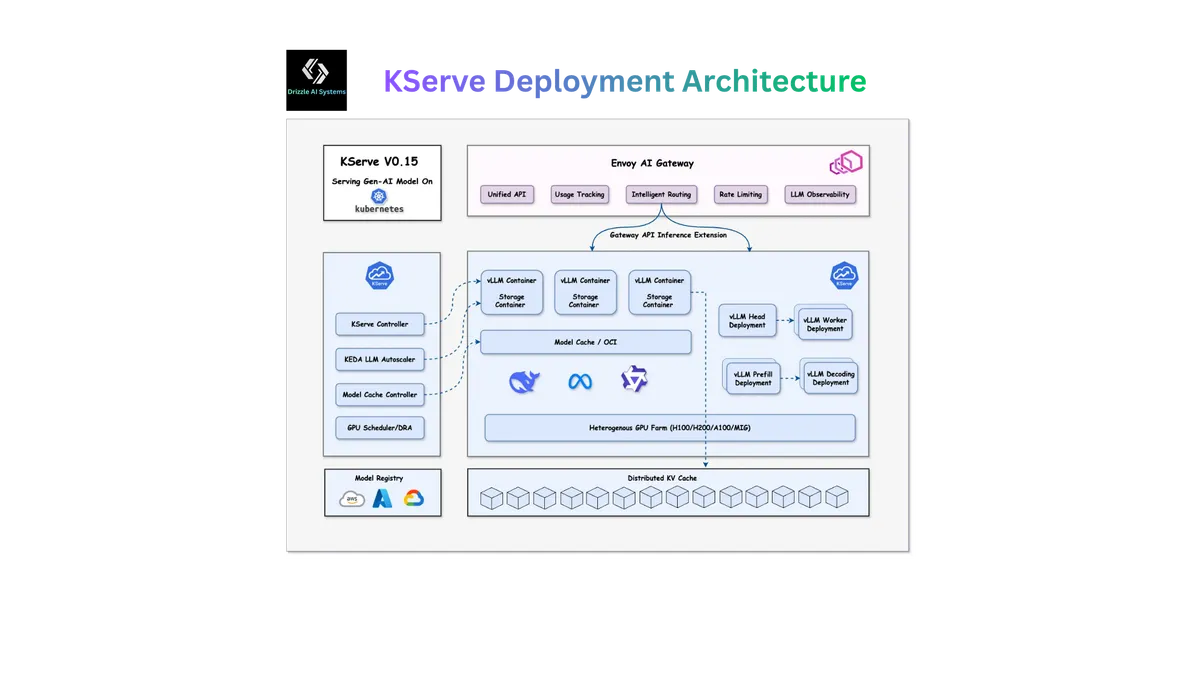
Table of Contents
- Introduction
- What You’ll Learn in This Blog
- The Gap: Why KServe Alone Isn’t Enough for Production
- I. GitOps Fundamentals for AI Infrastructure
- II. Designing the GitOps Repository Structure
- III. Lab: Deploy KServe with ArgoCD
- 1. Prerequisites
- 2. Install the Control Plane
- 3. Install ArgoCD and Bootstrap the Platform
- 4. Deploy Predictive Models via GitOps
- 5. Deploy Generative Models via GitOps
- 6. InferenceGraph: Multi-Model Pipelines via GitOps
- 7. Canary Rollouts via Git Commits
- 8. KEDA Autoscaling for LLMs
- 9. Monitoring via GitOps
- IV. Production Hardening: Beyond the Lab
- Conclusion: Declarative AI Infrastructure as the Standard
Introduction
In The Ultimate Guide to KServe, we walked through KServe’s architecture, deployment modes, and how to get an LLMInferenceService running on GKE. That guide solved the “what” and “how” of model serving. But once your first inference service is live, a new set of questions emerges: How do you version your KServe configurations? How do you promote model deployments from staging to production safely? How do you roll back a broken inference service at 2 AM without SSH-ing into a cluster and running kubectl by hand?
The answer is GitOps—and more specifically, ArgoCD.
This blog is the natural sequel to our KServe guide. Where the previous post ended with a manually deployed LLMInferenceService, this one picks up by wrapping that entire deployment lifecycle in a declarative, version-controlled, auditable GitOps pipeline. We’ll use ArgoCD to manage both predictive and generative AI models—ResNet-50, Sentence-BERT, and Mistral-7B—through a single Git repository, complete with canary rollouts, KEDA autoscaling, InferenceGraphs, and Prometheus monitoring.
This blog builds directly on
The Ultimate Guide to KServe
. We recommend reading that guide first for foundational KServe concepts, architecture, and deployment modes.
Everything in this guide is backed by a complete, open-source reference implementation:
Explore the KServe GitOps Reference Repository →
What You’ll Learn in This Blog
In this advanced guide, you’ll discover:
- The Gap: Why
kubectl applyis not a production deployment strategy, and the specific operational risks it introduces for AI inference workloads - GitOps Fundamentals for AI Infrastructure: How GitOps principles map to KServe resources, and why ArgoCD is the ideal fit for managing inference services declaratively
- Repository Design: How to structure a GitOps repository that separates predictive models, generative models, InferenceGraphs, and monitoring into distinct ArgoCD Applications with scoped permissions
- Hands-On Lab: End-to-end walkthrough—from bootstrapping the KServe control plane through ArgoCD, to deploying ResNet-50, Sentence-BERT, and Mistral-7B via Git commits, to performing canary rollouts by changing a single YAML field
- Production Hardening: Sync waves for dependency ordering, self-healing drift detection, ApplicationSets for multi-cluster AI serving, and LocalModelCache for eliminating LLM cold starts
By the end, you’ll have a production-grade blueprint where every infrastructure change is a pull request, every deployment is auditable, and every rollback is a git revert.
The Gap: Why KServe Alone Isn’t Enough for Production
In our previous guide, we deployed KServe components and inference services using a sequence of helm install and kubectl apply commands. This approach works perfectly for learning and experimentation, but it introduces serious operational risks when you move to production.
The Problem with Imperative AI Infrastructure
⚠️ Configuration Drift: Someone runs
kubectl editon the LLMInferenceService in production to “fix something quickly.” Now your cluster state doesn’t match what’s in your docs, scripts, or anyone’s memory.⚠️ No Audit Trail: Who changed the GPU limits on the Mistral serving pod last Thursday? With imperative commands, there’s no record.
⚠️ Unreproducible Environments: Your staging cluster was set up three months ago by an engineer who has since left. Nobody can reproduce it.
⚠️ Dangerous Rollbacks: Rolling back a broken model deployment means remembering (or guessing) the previous configuration and re-applying it manually under pressure.
⚠️ Multi-Cluster Complexity: When you need to deploy the same KServe stack across dev, staging, and production clusters, imperative scripts become a maintenance nightmare.
The KServe stack is particularly vulnerable to these problems because of its layered dependency chain. A working KServe deployment requires Istio, Knative Serving, KServe CRDs, KServe controller, KEDA, ServingRuntimes, and finally the inference services themselves. Each component has version dependencies on the others, and they must be installed in a specific order. Managing this imperatively across multiple environments is a recipe for production incidents.
This is precisely the problem that GitOps—and ArgoCD in particular—was designed to solve.
I. GitOps Fundamentals for AI Infrastructure
1. What is GitOps?
An operational framework that takes DevOps best practices used for application development—version control, collaboration, compliance, and CI/CD—and applies them to infrastructure automation. Git becomes the single source of truth for your declarative infrastructure and applications.
GitOps rests on four core principles that map directly to the challenges of managing AI infrastructure:
-
Declarative Configuration: Your entire KServe stack—from KEDA autoscaling policies to LLMInferenceService manifests—is described declaratively in YAML and stored in Git. There are no imperative scripts or manual kubectl commands required.
-
Versioned and Immutable: Every change to your AI serving infrastructure is a Git commit. Want to know who changed the GPU limits on the Mistral deployment? Check the Git log. Need to understand why autoscaling behavior changed? Read the diff.
-
Pulled Automatically: An agent running inside your cluster (ArgoCD) continuously pulls the desired state from Git and applies it. You don’t push configurations to the cluster—the cluster pulls them.
-
Continuously Reconciled: The agent doesn’t just apply changes once. It continuously compares the desired state (Git) with the actual state (cluster) and corrects any drift. If someone manually edits a KServe resource, ArgoCD will detect the change and revert it.
2. Why ArgoCD for KServe?
ArgoCD is a CNCF-graduated project and the most widely adopted GitOps engine for Kubernetes. Several characteristics make it particularly well-suited for managing KServe deployments:
CRD-Aware Sync: ArgoCD natively understands Kubernetes CRDs—critical since KServe is entirely built on CRDs (InferenceService, LLMInferenceService, ServingRuntime, InferenceGraph, LocalModelCache, etc.)
Sync Waves: KServe has strict dependency ordering (Istio → Knative → KServe CRDs → Controller → ServingRuntimes → InferenceServices). ArgoCD’s sync wave annotations handle this natively.
ApplicationSets: Deploy identical KServe stacks across multiple clusters with a single generator definition—essential for multi-region AI serving.
Helm + Kustomize Support: KServe’s control plane uses Helm charts, while model manifests are better managed as raw YAML. ArgoCD supports both natively.
Self-Heal: Automatically revert unauthorized manual changes to your GPU allocations, autoscaling configs, or model versions.
Retry with Backoff: Transient failures during model deployment (e.g., GPU node not yet available) are automatically retried.
As explored in the excellent reference How to Manage Kubeflow Pipelines with ArgoCD, ArgoCD excels at managing complex ML infrastructure stacks with many interdependent components. The patterns established there for Kubeflow Pipelines—structured GitOps repositories, sync wave ordering, environment overlays—translate directly to KServe deployments. This guide builds on those same foundational patterns while adapting them for KServe’s specific architecture.
3. The GitOps + KServe Architecture
The high-level architecture is straightforward: Git is the source of truth, ArgoCD is the reconciliation engine, and KServe is the execution layer.

Figure: KServe + ArgoCD GitOps Architecture
The workflow is as follows:
- An engineer commits a change to the Git repository (e.g., updating a model image tag, adding a new InferenceService, or adjusting autoscaling thresholds)
- ArgoCD detects the diff between the desired state (Git) and the actual state (cluster)
- ArgoCD syncs the changes—creating, updating, or pruning Kubernetes resources
- KServe’s controllers reconcile the InferenceService/LLMInferenceService resources, orchestrating pods, services, and routing
- If the cluster state drifts from Git (manual
kubectl edit, operator mutation, etc.), ArgoCD’s self-heal loop corrects it automatically
This separation of concerns is powerful: Git owns the “what,” ArgoCD owns the “when,” and KServe owns the “how.”
II. Designing the GitOps Repository Structure
1. Repository Layout
The reference implementation at github.com/AymenSegni/kserve-argo-ml-reference follows a deliberate structure that separates concerns cleanly:
kserve-argo-ml-reference/├── argocd/│ ├── project.yaml # AppProject: permission boundaries│ └── applications/│ ├── predictive.yaml # ArgoCD App → kserve/predictive/│ ├── generative.yaml # ArgoCD App → kserve/generative/│ ├── graphs.yaml # ArgoCD App → kserve/graphs/│ └── monitoring.yaml # ArgoCD App → monitoring/├── kserve/│ ├── predictive/ # Predictive ML models│ │ ├── resnet50-isvc.yaml│ │ └── sentence-bert-isvc.yaml│ ├── generative/ # Generative LLM models│ │ ├── mistral-isvc.yaml # Knative mode (batch)│ │ ├── mistral-realtime-isvc.yaml # Standard mode (KEDA)│ │ ├── mistral-llmisvc.yaml # LLMInferenceService (v0.17+)│ │ ├── local-model-cache.yaml # Pre-cache LLM weights│ │ ├── local-model-nodegroup.yaml│ │ └── serviceaccount.yaml│ ├── canary/│ │ └── resnet50-canary-isvc.yaml # Canary rollout example│ ├── autoscaling/│ │ └── keda-mistral.yaml # Standalone KEDA ScaledObject│ └── graphs/│ └── ml-pipeline-graph.yaml # InferenceGraph (Ensemble + Sequence)├── monitoring/│ ├── servicemonitors.yaml # Prometheus ServiceMonitors│ └── alerting-rules.yaml # PrometheusRule alert definitions├── models/ # Custom model server source code│ ├── resnet50-server/│ │ ├── model.py│ │ ├── Dockerfile│ │ └── requirements.txt│ └── sentence-bert-server/│ ├── model.py│ ├── Dockerfile│ └── requirements.txt├── scripts/│ ├── setup/ # One-time setup scripts│ │ ├── setup_controlplane.sh│ │ ├── setup_argocd.sh│ │ ├── setup_namespaces.sh│ │ └── setup_secrets.sh│ ├── validate/ # Validation scripts│ └── smoke/ # End-to-end smoke tests└── docs/ ├── kserve-features-reference.md └── model-onboarding-guide.mdThe key design principle: each ArgoCD Application maps to exactly one directory, and each directory contains one category of KServe resources. This means you can deploy and manage predictive models independently from generative models, and both independently from monitoring. A failed sync in the monitoring Application doesn’t block your model deployments.
2. The ArgoCD AppProject: Scoping Permissions
Before creating any Applications, we define an AppProject that scopes what resources ArgoCD is allowed to manage. This is a security boundary—it prevents a misconfigured Application from accidentally modifying resources outside the ML platform namespaces.
# Source: https://github.com/AymenSegni/kserve-argo-ml-reference/blob/main/argocd/project.yamlapiVersion: argoproj.io/v1alpha1kind: AppProjectmetadata: name: kserve-gitops-blueprint namespace: argocdspec: description: "A production-grade GitOps blueprint for deploying generative and predictive AI on Kubernetes using KServe, vLLM, and ArgoCD." sourceRepos: - "https://github.com/AymenSegni/kserve-gitops-blueprint.git" destinations: - namespace: "ml-predictive" server: "https://kubernetes.default.svc" - namespace: "ml-generative" server: "https://kubernetes.default.svc" - namespace: "ml-graphs" server: "https://kubernetes.default.svc" - namespace: "ml-monitoring" server: "https://kubernetes.default.svc" clusterResourceWhitelist: - group: "serving.kserve.io" kind: "*" - group: "keda.sh" kind: "*" namespaceResourceWhitelist: - group: "serving.kserve.io" kind: "*" - group: "keda.sh" kind: "*" - group: "monitoring.coreos.com" kind: "*" orphanedResources: warn: trueNotice the explicit destinations list—ArgoCD can only deploy into the four ML namespaces (ml-predictive, ml-generative, ml-graphs, ml-monitoring). The clusterResourceWhitelist and namespaceResourceWhitelist further restrict which CRD types are allowed, ensuring that only KServe, KEDA, and Prometheus resources can be managed through this project.
3. ArgoCD Applications: One Per Concern
Each ArgoCD Application points to a specific directory in the Git repo and deploys its contents into a specific namespace. Here’s the generative models Application:
# Source: https://github.com/AymenSegni/kserve-argo-ml-reference/blob/main/argocd/applications/generative.yamlapiVersion: argoproj.io/v1alpha1kind: Applicationmetadata: name: ml-generative namespace: argocd labels: app.kubernetes.io/part-of: kserve-gitops-blueprint app.kubernetes.io/component: inference-generativespec: project: kserve-gitops-blueprint source: repoURL: "https://github.com/AymenSegni/kserve-gitops-blueprint.git" targetRevision: main path: kserve/generative destination: server: "https://kubernetes.default.svc" namespace: ml-generative syncPolicy: automated: prune: true selfHeal: true syncOptions: - CreateNamespace=false - ApplyOutOfSyncOnly=true retry: limit: 3 backoff: duration: 5s factor: 2 maxDuration: 3mSeveral configuration choices here are deliberate for AI workloads:
automated.prune: true: If you delete an InferenceService YAML from the repo, ArgoCD removes it from the cluster. No orphaned GPU-consuming pods.automated.selfHeal: true: If someone runskubectl edit isvc mistral-batch -n ml-generative, ArgoCD reverts the change within seconds.ApplyOutOfSyncOnly: true: Only re-apply resources that have actually changed, avoiding unnecessary reconciliation of healthy inference services.retrywith exponential backoff: GPU node provisioning can take minutes. The retry policy gives the cluster time to scale before marking the sync as failed.
The same pattern applies for predictive models, InferenceGraphs, and monitoring—each with its own Application pointing to its own directory.
4. Managing Secrets in a GitOps World
Secrets are the one thing you should never store in Git. The reference implementation handles this with a dedicated secrets setup script that distributes credentials before ArgoCD takes over:
# scripts/setup/setup_secrets.sh (excerpt)# Source: https://github.com/AymenSegni/kserve-argo-ml-reference/blob/main/scripts/setup/setup_secrets.sh
# Usage:#   export HF_TOKEN="hf_xxxxx"#   bash scripts/setup/setup_secrets.sh
HF_SECRET_NAME="hf-token-secret"
GENERATIVE_NAMESPACES=(  ml-generative)
if [[ -n "${HF_TOKEN:-}" ]]; then  for ns in "${GENERATIVE_NAMESPACES[@]}"; do    if kubectl get secret "$HF_SECRET_NAME" -n "$ns" &>/dev/null; then      kubectl delete secret "$HF_SECRET_NAME" -n "$ns"    fi    kubectl create secret generic "$HF_SECRET_NAME" -n "$ns" \      --from-literal=HF_TOKEN="$HF_TOKEN"    kubectl annotate secret "$HF_SECRET_NAME" -n "$ns" \      serving.kserve.io/secretKey=HF_TOKEN --overwrite  donefi
The KServe manifests then reference these secrets via valueFrom.secretKeyRef—never embedding the actual token value. This clean separation means ArgoCD manages the declarative resources (InferenceServices, ServiceMonitors) while secrets are provisioned out-of-band.
For production environments, consider replacing the manual secrets script with
External Secrets Operator
or
Sealed Secrets
—both integrate with ArgoCD to pull secrets from Vault, AWS Secrets Manager, or GCP Secret Manager declaratively.
III. Lab: Deploy KServe with ArgoCD
In this hands-on lab, you’ll deploy a complete ML serving platform using the kserve-argo-ml-reference repository. The platform includes three models (ResNet-50, Sentence-BERT, Mistral-7B), an InferenceGraph pipeline, KEDA autoscaling, canary rollouts, and Prometheus monitoring—all managed declaratively through ArgoCD.
1. Prerequisites
Ensure you have the following tools installed:
- kubectl- helm- istioctl- argocd CLI (optional, for CLI-based management)- A Kubernetes cluster with GPU nodes (for generative models)Clone the reference repository:
git clone https://github.com/AymenSegni/kserve-argo-ml-reference.gitcd kserve-argo-ml-reference2. Install the Control Plane
The control plane setup script installs Istio, Knative Serving, KServe, and KEDA idempotently:
# Source: https://github.com/AymenSegni/kserve-argo-ml-reference/blob/main/scripts/setup/setup_controlplane.shbash scripts/setup/setup_controlplane.shUnder the hood, this script performs four steps in strict order:
# Step 1: Istio (minimal profile for KServe networking)istioctl install --set profile=minimal -y
# Step 2: Knative Serving (serverless capabilities for scale-to-zero)kubectl apply -f "https://github.com/knative/serving/releases/download/knative-v1.15.2/serving-crds.yaml"kubectl apply -f "https://github.com/knative/serving/releases/download/knative-v1.15.2/serving-core.yaml"kubectl apply -f "https://github.com/knative/net-istio/releases/download/knative-v1.15.2/net-istio.yaml"
# Step 3: KServe CRDs and controllerkubectl apply --server-side -f "https://github.com/kserve/kserve/releases/download/v0.17.0/kserve.yaml"kubectl apply -f "https://github.com/kserve/kserve/releases/download/v0.17.0/kserve-cluster-resources.yaml"
# Step 4: KEDA for advanced autoscalinghelm install keda kedacore/keda --namespace keda --create-namespace --version 2.17.0 --wait
Each step is idempotent—if a component already exists, the script skips it. This makes it safe to re-run after partial failures.
Next, create the namespaces and distribute secrets:
bash scripts/setup/setup_namespaces.sh
export HF_TOKEN="hf_your_token_here"bash scripts/setup/setup_secrets.sh
3. Install ArgoCD and Bootstrap the Platform
This is where things get interesting. A single script installs ArgoCD, applies the AppProject, and deploys all four ArgoCD Applications:
# Source: https://github.com/AymenSegni/kserve-argo-ml-reference/blob/main/scripts/setup/setup_argocd.shbash scripts/setup/setup_argocd.shHere’s what happens:
# Install ArgoCD via Helmhelm install argocd argo/argo-cd \  --namespace argocd \  --create-namespace \  --version "7.7.16" \  --set server.service.type=ClusterIP \  --wait
# Wait for ArgoCD to be readykubectl wait --for=condition=available deployment/argocd-server \  -n argocd --timeout=120s
# Apply AppProject (permission boundaries)kubectl apply -f argocd/project.yaml
# Apply all Applications (one per directory)kubectl apply -f argocd/applications/
After this, ArgoCD will auto-sync all manifests from the repository. Access the ArgoCD UI:
kubectl port-forward svc/argocd-server -n argocd 8080:443# Open https://localhost:8080
# Get the admin passwordkubectl -n argocd get secret argocd-initial-admin-secret \  -o jsonpath="{.data.password}" | base64 -d
You should see four Applications in the ArgoCD dashboard: ml-predictive, ml-generative, ml-graphs, and ml-monitoring—all syncing automatically.
4. Deploy Predictive Models via GitOps
The predictive models directory contains two InferenceServices that ArgoCD auto-syncs. Here’s the ResNet-50 deployment:
# Source: https://github.com/AymenSegni/kserve-argo-ml-reference/blob/main/kserve/predictive/resnet50-isvc.yamlapiVersion: serving.kserve.io/v1beta1kind: InferenceServicemetadata: name: resnet50 namespace: ml-predictive annotations: autoscaling.knative.dev/min-scale: "0" autoscaling.knative.dev/max-scale: "3" autoscaling.knative.dev/target: "10" serving.kserve.io/enable-prometheus-scraping: "true"spec: predictor: containers: - name: kserve-container image: ghcr.io/aymensegni/resnet50-server:v1 ports: - containerPort: 8080 protocol: TCP env: - name: MODEL_NAME value: resnet50 resources: requests: cpu: "1" memory: 2Gi limits: cpu: "2" memory: 4Gi readinessProbe: httpGet: path: /v2/health/ready port: 8080 initialDelaySeconds: 15 periodSeconds: 10 livenessProbe: httpGet: path: /v2/health/live port: 8080 initialDelaySeconds: 15 periodSeconds: 10This uses a custom model server implementing the KServe V2 Open Inference Protocol. The server code lives in models/resnet50-server/model.py and extends kserve.Model with preprocess(), predict(), and postprocess() methods:
# models/resnet50-server/model.py (excerpt)# Source: https://github.com/AymenSegni/kserve-argo-ml-reference/blob/main/models/resnet50-server/model.pyclass ResNet50Server(kserve.Model):    def load(self):        weights = models.ResNet50_Weights.DEFAULT        self.model = models.resnet50(weights=weights)        self.model.to(self.device)        self.model.eval()        self.preprocess_transform = weights.transforms()        self.categories = weights.meta["categories"]        self.ready = True
    def preprocess(self, payload: InferRequest, headers=None):        inputs = payload.inputs        images = []        for inp in inputs:            data = inp.data[0]            if isinstance(data, str):                image_bytes = base64.b64decode(data)            else:                image_bytes = data            img = Image.open(io.BytesIO(image_bytes)).convert("RGB")            tensor = self.preprocess_transform(img).to(self.device)            images.append(tensor)        return images
    def predict(self, inputs, headers=None):        batch = torch.stack(inputs)        with torch.no_grad():            outputs = self.model(batch)            probabilities = torch.nn.functional.softmax(outputs, dim=1)        return probabilities
The key insight: you don’t deploy this model by running a command. You commit the YAML file to Git, push, and ArgoCD handles the rest. To update the model to a new version, you change the image tag in the YAML and push again.
5. Deploy Generative Models via GitOps
The reference implementation includes three different approaches to deploying Mistral-7B, demonstrating KServe’s flexibility:
Option A: Knative Mode (Batch/Async)—scale-to-zero when idle, perfect for cost-efficient batch inference:
# Source: https://github.com/AymenSegni/kserve-argo-ml-reference/blob/main/kserve/generative/mistral-isvc.yamlapiVersion: serving.kserve.io/v1beta1kind: InferenceServicemetadata: name: mistral-batch namespace: ml-generative annotations: autoscaling.knative.dev/min-scale: "0" autoscaling.knative.dev/max-scale: "2" serving.kserve.io/enable-prometheus-scraping: "true"spec: predictor: model: modelFormat: name: huggingface env: - name: HF_TOKEN valueFrom: secretKeyRef: name: hf-token-secret key: HF_TOKEN args: - --model_id=mistralai/Mistral-7B-Instruct-v0.3 - --model_name=mistral-7b - --dtype=bfloat16 - --max_model_len=8192 - --tensor_parallel_size=1 - --backend=vllm - --gpu_memory_utilization=0.90 resources: requests: cpu: "4" memory: 16Gi nvidia.com/gpu: "1" limits: cpu: "8" memory: 32Gi nvidia.com/gpu: "1" runtimeClassName: nvidia serviceAccountName: ml-generative-saOption B: Standard Mode with KEDA (Real-time)—always warm with at least 1 replica, autoscaling on vLLM concurrency metrics:
# Source: https://github.com/AymenSegni/kserve-argo-ml-reference/blob/main/kserve/generative/mistral-realtime-isvc.yamlapiVersion: serving.kserve.io/v1beta1kind: InferenceServicemetadata: name: mistral-realtime namespace: ml-generative annotations: serving.kserve.io/deploymentMode: "Standard" serving.kserve.io/autoscalerClass: "keda" serving.kserve.io/enable-prometheus-scraping: "true"spec: predictor: model: modelFormat: name: huggingface args: - --model_id=mistralai/Mistral-7B-Instruct-v0.3 - --backend=vllm - --gpu_memory_utilization=0.90 # ...same resource config as above... minReplicas: 1 maxReplicas: 3 autoScaling: metrics: - type: External external: metric: backend: "prometheus" serverAddress: "http://kube-prometheus-stack-prometheus.monitoring.svc:9090" query: >- sum(vllm:num_requests_running{namespace="ml-generative", pod=~"mistral-realtime-predictor.*"}) target: type: Value value: "3"Option C: LLMInferenceService (v0.17+)—the new simplified CRD specifically designed for LLM workloads:
# Source: https://github.com/AymenSegni/kserve-argo-ml-reference/blob/main/kserve/generative/mistral-llmisvc.yamlapiVersion: serving.kserve.io/v1alpha1kind: LLMInferenceServicemetadata: name: mistral-llm namespace: ml-generative annotations: serving.kserve.io/enable-prometheus-scraping: "true"spec: modelUri: hf://mistralai/Mistral-7B-Instruct-v0.3 replicas: 1 workerSpec: tensorParallelSize: 1 resources: requests: cpu: "4" memory: 16Gi nvidia.com/gpu: "1" limits: cpu: "8" memory: 32Gi nvidia.com/gpu: "1" env: - name: HF_TOKEN valueFrom: secretKeyRef: name: hf-token-secret key: HF_TOKEN runtimeClassName: nvidiaAll three manifests live side-by-side in kserve/generative/ and ArgoCD deploys them all automatically. This is the power of the GitOps approach—you can experiment with different deployment modes by simply committing new YAML files.
6. InferenceGraph: Multi-Model Pipelines via GitOps
KServe’s InferenceGraph CRD allows you to chain multiple models into a DAG pipeline. The reference implementation demonstrates an Ensemble + Sequence pattern:
# Source: https://github.com/AymenSegni/kserve-argo-ml-reference/blob/main/kserve/graphs/ml-pipeline-graph.yamlapiVersion: serving.kserve.io/v1alpha1kind: InferenceGraphmetadata:  name: ml-pipeline  namespace: ml-graphsspec:  nodes:    root:      routerType: Ensemble      steps:        - name: image-features          serviceName: resnet50          serviceNamespace: ml-predictive          serviceUrl: http://resnet50-predictor.ml-predictive.svc.cluster.local        - name: text-features          serviceName: sentence-bert          serviceNamespace: ml-predictive          serviceUrl: http://sentence-bert-predictor.ml-predictive.svc.cluster.local        - nodeName: sequence-node
    sequence-node:      routerType: Sequence      steps:        - name: generator          serviceName: mistral-batch          serviceNamespace: ml-generative          serviceUrl: http://mistral-batch-predictor.ml-generative.svc.cluster.local
This pipeline sends input to both ResNet-50 and Sentence-BERT in parallel (Ensemble), then feeds the combined output to Mistral-7B for generation (Sequence). Because it’s managed through ArgoCD, modifying the pipeline topology—adding a new model step, changing routing logic—is a Git commit.
7. Canary Rollouts via Git Commits
Canary deployments in KServe work by updating the same InferenceService with a new image and adding canaryTrafficPercent. With GitOps, this becomes a simple, auditable file change:
# Source: https://github.com/AymenSegni/kserve-argo-ml-reference/blob/main/kserve/canary/resnet50-canary-isvc.yamlapiVersion: serving.kserve.io/v1beta1kind: InferenceServicemetadata: # Same name as original — this is an UPDATE, not a new service name: resnet50 namespace: ml-predictivespec: predictor: # 10% of traffic goes to the canary revision canaryTrafficPercent: 10 containers: - name: kserve-container # Updated image (v2) — the canary image: ghcr.io/aymensegni/resnet50-server:v2 ports: - containerPort: 8080 protocol: TCP # ...same resources and probes...The canary workflow with GitOps is clean:
- Create a branch:
git checkout -b canary/resnet50-v2 - Copy
resnet50-isvc.yaml→ update the image to:v2, addcanaryTrafficPercent: 10 - Open a pull request—your team reviews the config change just like code
- Merge → ArgoCD syncs → KServe splits traffic 90/10
- Monitor metrics. If the canary is healthy, remove
canaryTrafficPercentand push again - If the canary fails:
git revert→ ArgoCD syncs → instant rollback
No kubectl commands required. The entire canary lifecycle is a Git history.
8. KEDA Autoscaling for LLMs
For LLM workloads where Knative’s concurrency-based scaling isn’t sufficient, KEDA provides Prometheus-driven autoscaling. The reference includes a standalone ScaledObject:
# Source: https://github.com/AymenSegni/kserve-argo-ml-reference/blob/main/kserve/autoscaling/keda-mistral.yamlapiVersion: keda.sh/v1alpha1kind: ScaledObjectmetadata: name: keda-mistral namespace: ml-generativespec: scaleTargetRef: apiVersion: apps/v1 kind: Deployment name: mistral-realtime-predictor-default minReplicaCount: 1 maxReplicaCount: 3 cooldownPeriod: 300 pollingInterval: 15 triggers: - type: prometheus metadata: serverAddress: "http://kube-prometheus-stack-prometheus.monitoring.svc:9090" metricName: vllm_active_requests threshold: "3" query: >- sum(vllm:num_requests_running{namespace="ml-generative", pod=~"mistral-realtime-predictor-default.*"})This scales the Mistral-7B deployment based on actual vLLM active request count—a much more accurate signal than CPU utilization for GPU-bound LLM workloads. The cooldownPeriod: 300 (5 minutes) prevents premature scale-down, accounting for the high cost of LLM cold starts.
KServe supports inline KEDA autoscaling via the
serving.kserve.io/autoscalerClass: "keda" annotation (shown in the
mistral-realtime-isvc.yaml). The standalone ScaledObject in
keda-mistral.yaml is an alternative for cases where you
need KEDA features that KServe’s inline integration doesn’t expose (custom
cooldown, advanced triggers, fallback behavior). Do not
apply both simultaneously—they will conflict.
9. Monitoring via GitOps
The monitoring directory contains Prometheus ServiceMonitors and alerting rules, also managed by ArgoCD:
# monitoring/servicemonitors.yaml (excerpt)# Source: https://github.com/AymenSegni/kserve-argo-ml-reference/blob/main/monitoring/servicemonitors.yamlapiVersion: monitoring.coreos.com/v1kind: ServiceMonitormetadata: name: kserve-inference-metrics namespace: ml-monitoringspec: namespaceSelector: matchNames: - ml-predictive - ml-generative - ml-graphs selector: matchExpressions: - key: serving.kserve.io/inferenceservice operator: Exists endpoints: - port: http path: /metrics interval: 15s honorLabels: true - port: metrics path: /metrics interval: 15s honorLabels: trueAnd the alerting rules fire when inference services are unhealthy:
# monitoring/alerting-rules.yaml (excerpt)# Source: https://github.com/AymenSegni/kserve-argo-ml-reference/blob/main/monitoring/alerting-rules.yamlapiVersion: monitoring.coreos.com/v1kind: PrometheusRulemetadata:  name: kserve-alerts  namespace: ml-monitoringspec:  groups:    - name: kserve.inference      rules:        - alert: InferenceServiceNotReady          expr: |            kserve_inferenceservice_status{condition="Ready",status="True"} == 0          for: 10m          labels:            severity: critical          annotations:            summary: "InferenceService {{ $labels.name }} is not ready"
        - alert: HighInferenceErrorRate          expr: |            sum by (model_name, namespace) (              rate(kserve_model_request_total{response_code!="200"}[5m])            ) /            sum by (model_name, namespace) (              rate(kserve_model_request_total[5m])            ) > 0.05          for: 5m          labels:            severity: warning
    - name: kserve.vllm      rules:        - alert: VLLMRequestQueueGrowing          expr: |            sum(vllm:num_requests_waiting{namespace="ml-generative"}) > 10          for: 5m          labels:            severity: warning
Because monitoring configuration is managed through ArgoCD just like the inference services, your alerting rules evolve alongside your model deployments—always in sync, always version-controlled.
IV. Production Hardening: Beyond the Lab
1. Sync Waves and Dependency Ordering
KServe has strict dependency ordering: CRDs must exist before the controller, the controller must be running before InferenceServices can be created, and InferenceServices must be deployed before InferenceGraphs can reference them.
ArgoCD’s sync-wave annotation handles this natively. You can extend the reference implementation with wave annotations on the Applications:
# Example: Adding sync-wave annotations for dependency orderingmetadata: name: ml-predictive annotations: argocd.argoproj.io/sync-wave: "1" # Deploy predictive models first---metadata: name: ml-generative annotations: argocd.argoproj.io/sync-wave: "1" # Deploy generative models in parallel---metadata: name: ml-graphs annotations: argocd.argoproj.io/sync-wave: "2" # Deploy graphs AFTER models exist---metadata: name: ml-monitoring annotations: argocd.argoproj.io/sync-wave: "3" # Deploy monitoring lastThis ensures that InferenceGraphs are never synced before the InferenceServices they reference are available.
2. Self-Healing and Drift Detection
With selfHeal: true enabled on all Applications, ArgoCD continuously monitors for drift between Git and the cluster. This is particularly valuable for AI workloads where:
- An engineer might manually scale a deployment during a traffic spike and forget to revert
- A cluster autoscaler might mutate pod resource fields
- A KServe controller upgrade might introduce defaulting behavior that modifies your InferenceService specs
When drift is detected, ArgoCD automatically reconciles back to the Git-defined state. The orphanedResources: warn: true setting in the AppProject additionally warns you about resources in the ML namespaces that aren’t tracked by any Application—a common source of “ghost” GPU workloads consuming expensive resources.
3. ApplicationSets for Multi-Cluster AI Serving
When you need to deploy the same KServe stack across multiple clusters (e.g., us-east, eu-west, ap-southeast for low-latency global inference), ArgoCD’s ApplicationSet generator eliminates duplication:
apiVersion: argoproj.io/v1alpha1kind: ApplicationSetmetadata: name: kserve-multi-cluster namespace: argocdspec: generators: - list: elements: - cluster: us-east-prod server: https://us-east.k8s.example.com - cluster: eu-west-prod server: https://eu-west.k8s.example.com template: metadata: name: "ml-generative-{{cluster}}" spec: project: kserve-gitops-blueprint source: repoURL: "https://github.com/AymenSegni/kserve-gitops-blueprint.git" targetRevision: main path: kserve/generative destination: server: "{{server}}" namespace: ml-generative syncPolicy: automated: prune: true selfHeal: trueOne YAML definition, N cluster deployments—all kept in sync automatically.
4. LocalModelCache: Solving Cold Starts via GitOps
LLM cold starts can take 10-20 minutes as models download from Hugging Face Hub. KServe’s LocalModelCache CRD pre-caches model weights on GPU nodes, and it fits perfectly into the GitOps model:
# Source: https://github.com/AymenSegni/kserve-argo-ml-reference/blob/main/kserve/generative/local-model-cache.yamlapiVersion: serving.kserve.io/v1alpha1kind: LocalModelCachemetadata: name: mistral-7b-cache namespace: ml-generativespec: sourceModelUri: "hf://mistralai/Mistral-7B-Instruct-v0.3" modelSize: "15Gi" nodeGroup: "gpu-nodes"The companion LocalModelNodeGroup configures which nodes participate in caching:
# Source: https://github.com/AymenSegni/kserve-argo-ml-reference/blob/main/kserve/generative/local-model-nodegroup.yamlapiVersion: serving.kserve.io/v1alpha1kind: LocalModelNodeGroupmetadata: name: gpu-nodes namespace: ml-generativespec: nodeSelector: nvidia.com/gpu.present: "true" persistentVolumeClaim: accessModes: - ReadWriteOnce resources: requests: storage: 100Gi storageClassName: local-nvmeBecause these resources are managed by ArgoCD, adding a new model to the cache is a Git commit. Removing a cached model is a file deletion. The full lifecycle is version-controlled.
Conclusion: Declarative AI Infrastructure as the Standard
KServe provides the powerful, open-source building blocks for enterprise-grade model serving—autoscaling, canary rollouts, InferenceGraphs, multi-model pipelines, and LLM-specific optimizations. ArgoCD provides the operational layer that makes these capabilities safe, repeatable, and auditable in production.
Together, they establish a pattern where:
- Every model deployment is a Git commit with a full audit trail
- Every rollback is a
git revert—no panic-drivenkubectlcommands - Every environment is reproducible from a single Git repository
- Every configuration drift is automatically corrected by self-healing reconciliation
- Every canary rollout is a pull request that your team reviews before merging
The kserve-argo-ml-reference repository provides a complete, production-grade starting point for this pattern. Fork it, adapt it to your models and infrastructure, and start managing your AI serving platform the way your application code is already managed—through Git.
But building, securing, and scaling a complete production AI platform around KServe and ArgoCD requires deep expertise in Kubernetes, MLOps, security, and infrastructure management. At Drizzle AI Systems (a.k.a DAIS), we specialize in exactly this—turning open-source components into battle-tested, managed AI infrastructure.
Ready to bring GitOps to your AI infrastructure?
Schedule a Free 30-Minute Strategy Session with our AI infrastructure experts. In this consultation, you’ll get:
- ✅ Architecture review of your current or planned KServe + GitOps deployment
- ✅ Repository structure recommendations tailored to your team and model portfolio
- ✅ Multi-cluster and multi-environment strategy for your specific use case
- ✅ CI/CD pipeline design for model training → registry → serving → monitoring
- ✅ Clear roadmap from proof-of-concept to production-ready GitOps infrastructure
Explore the Reference Implementation
The complete, open-source reference implementation is available on GitHub:
View the KServe GitOps Reference Repository →
Share This Guide
Found this guide helpful? Share it with your team:
Questions or feedback? Reach out to us at contact@drizzle.systems or connect with me on LinkedIn.
Frequently Asked Questions (FAQ)
Why not use Flux instead of ArgoCD?
Both are excellent CNCF GitOps projects. We chose ArgoCD for this reference because of its superior CRD sync visualization (you can see InferenceService health status directly in the ArgoCD UI), sync waves for dependency ordering, and ApplicationSets for multi-cluster deployment. Flux is equally capable—the GitOps patterns in this guide transfer directly.
Can I use ArgoCD to manage the KServe control plane itself?
Yes, and for mature teams we recommend it. You can create a separate ArgoCD Application that points to the KServe Helm chart, managing the controller version through Git. The control plane setup script in this reference is designed as a bootstrap step—once running, you can migrate it to ArgoCD management.
How do I handle model A/B testing with ArgoCD?
KServe’s canaryTrafficPercent field is your tool for A/B testing. Deploy the new model version with a traffic split (e.g., 10%), monitor performance metrics through the ServiceMonitors, and promote or rollback by adjusting the percentage in Git. ArgoCD’s diff visualization makes it easy to review traffic split changes in pull requests.
What about CI? Where does model training fit?
This guide focuses on the CD (Continuous Delivery) side—managing the deployment and runtime configuration of trained models. The CI side (training pipelines, model registry, image building) sits upstream. A common pattern: Kubeflow Pipelines or Argo Workflows handles training → publishes a new model image to a container registry → a PR is opened against the GitOps repo with the updated image tag → ArgoCD deploys it.
How do I add a new model to the platform?
Follow the Model Onboarding Guide in the reference repo. In brief: create a model server (or use a built-in runtime), add a YAML manifest to the appropriate kserve/ subdirectory, commit, and push. ArgoCD picks it up automatically.
Will ArgoCD conflict with KServe’s own controller reconciliation?
No. ArgoCD manages the desired state of the InferenceService resource itself (the YAML you define). KServe’s controller reconciles the child resources (Deployments, Services, Knative Revisions) that the InferenceService creates. They operate at different levels and complement each other. The ApplyOutOfSyncOnly sync option prevents unnecessary re-application.
Is LLMInferenceService production-ready?
As of KServe v0.17, LLMInferenceService is in v1alpha1 and considered pre-GA. The reference includes it to demonstrate the API, but for production LLM serving, the standard InferenceService with HuggingFace runtime + vLLM backend (as shown in mistral-realtime-isvc.yaml) remains the recommended approach.
KServe Features Covered in This Reference
| Feature | Manifest | Description |
|---|---|---|
| InferenceService (predictive) | resnet50-isvc.yaml, sentence-bert-isvc.yaml | Custom model servers with V2 protocol |
| InferenceService (generative) | mistral-isvc.yaml, mistral-realtime-isvc.yaml | HuggingFace runtime + vLLM backend |
| LLMInferenceService | mistral-llmisvc.yaml | Simplified LLM CRD (v0.17+ alpha) |
| Knative Autoscaling (KPA) | resnet50-isvc.yaml | Scale 0→N on request concurrency |
| KEDA Autoscaling | keda-mistral.yaml | Scale on vLLM Prometheus metrics |
| InferenceGraph | ml-pipeline-graph.yaml | Ensemble + Sequence multi-model pipeline |
| LocalModelCache | local-model-cache.yaml | Pre-cache LLM weights on GPU nodes |
| Canary Rollout | resnet50-canary-isvc.yaml | 90/10 traffic split via image update |
| ArgoCD GitOps | argocd/applications/*.yaml | Auto-sync, self-heal, retry with backoff |
| Prometheus Monitoring | monitoring/*.yaml | ServiceMonitors + alerting rules |
For detailed explanations with links to upstream KServe docs, see the KServe Features Reference.